> ## Documentation Index
> Fetch the complete documentation index at: https://docs.routerlink.ai/llms.txt
> Use this file to discover all available pages before exploring further.

# RouterLink Starter

> RouterLink Starter 目前处于 Beta 阶段。如遇任何问题，请通过 [support@routerlink.ai](mailto:support@routerlink.ai) 与我们联系。

# **RouterLink Starter 简介**
<Frame>
  <img src="https://mintcdn.com/matrixlabs/DLlrmsnO_vBIIxZH/images/image-91.png?fit=max&auto=format&n=DLlrmsnO_vBIIxZH&q=85&s=ef6715d29d5388a19893f592dda7472a" alt="Image" width="1283" height="815" data-path="images/image-91.png" />
</Frame>

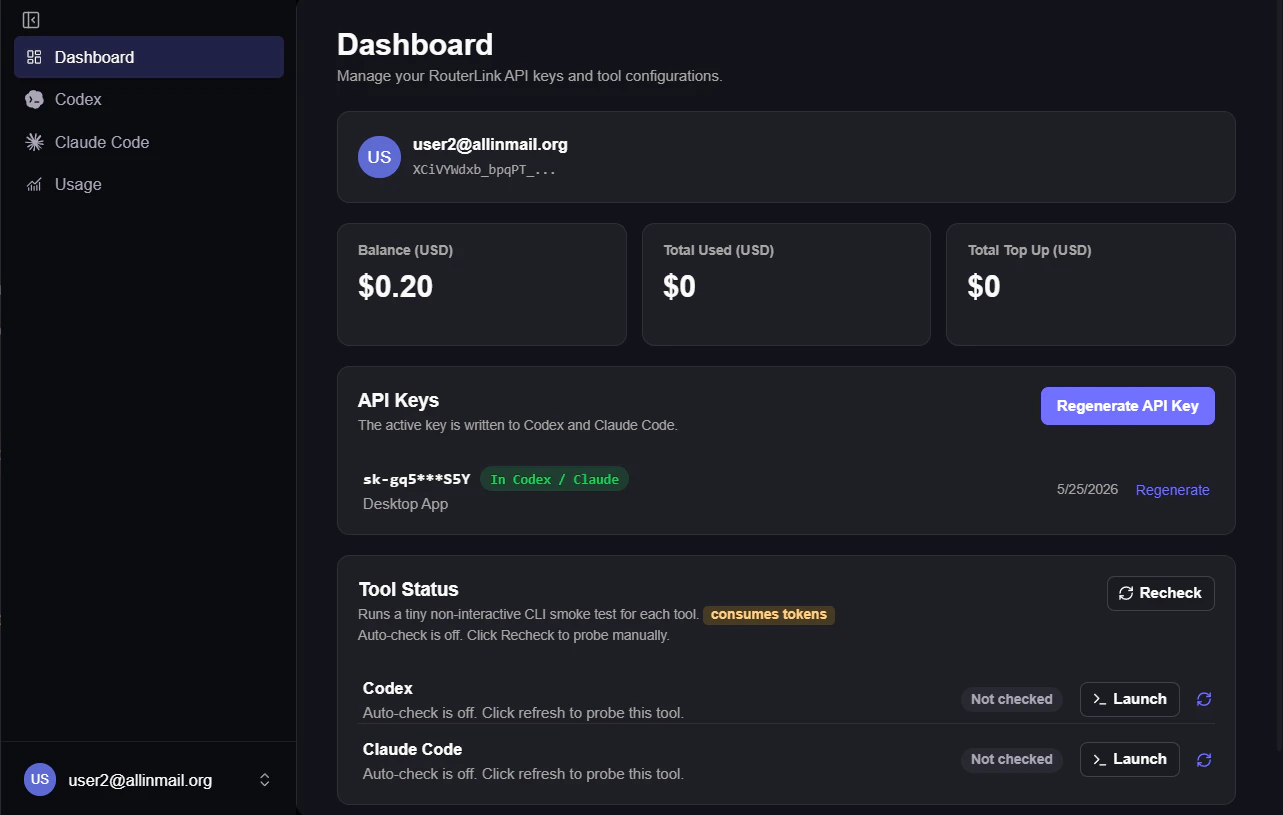
RouterLink Starter 是由 [RouterLink](https://routerlink.ai/?utm_source=chatgpt.com) 官方开发的桌面应用，可一键完成 Claude Code CLI 与 Codex 的安装、配置和管理。

# **步骤**

<Steps>
  <Step title="安装">
    > Windows 用户可能遇到”阻止了无法识别的应用启动“的提醒，这是正常的，请选择“仍要运行”

    下载网址：[https://routerlink.ai/download](https://routerlink.ai/download)

    目前支持 Windows, macOS。
  </Step>

  <Step title="配置">
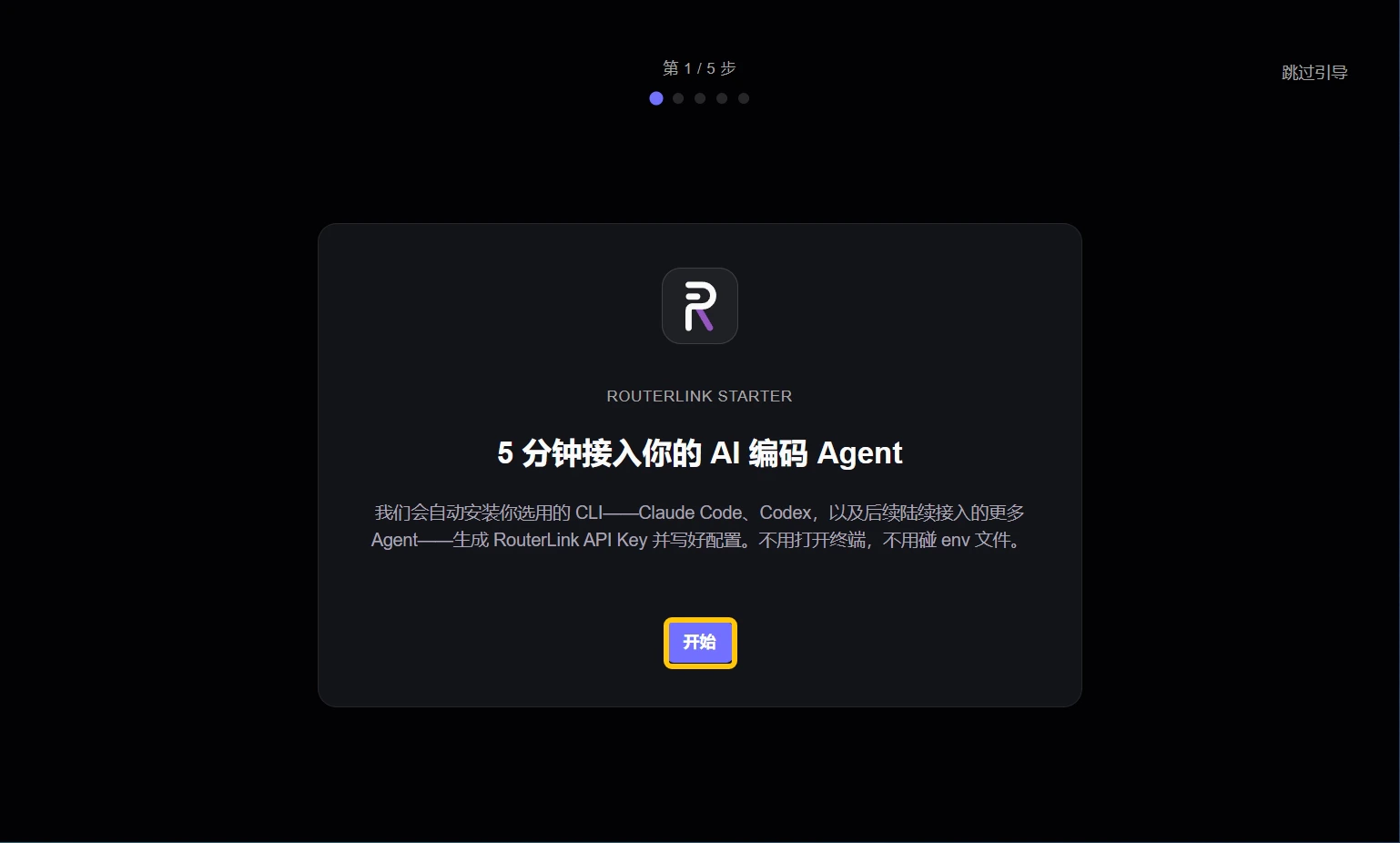
    进入 Starter 后，点击 "开始"。

    <Frame>
      <img src="https://mintcdn.com/matrixlabs/DLlrmsnO_vBIIxZH/images/img_v3_02121_3b060144-c29a-4026-bdce-968b80e657hu.jpg?fit=max&auto=format&n=DLlrmsnO_vBIIxZH&q=85&s=d2e6c8aef7444a62bf80a4b4e352e5f5" alt="Img V3 02121 3b060144 C29a 4026 Bdce 968b80e657hu" width="1538" height="926" data-path="images/img_v3_02121_3b060144-c29a-4026-bdce-968b80e657hu.jpg" />
    </Frame>

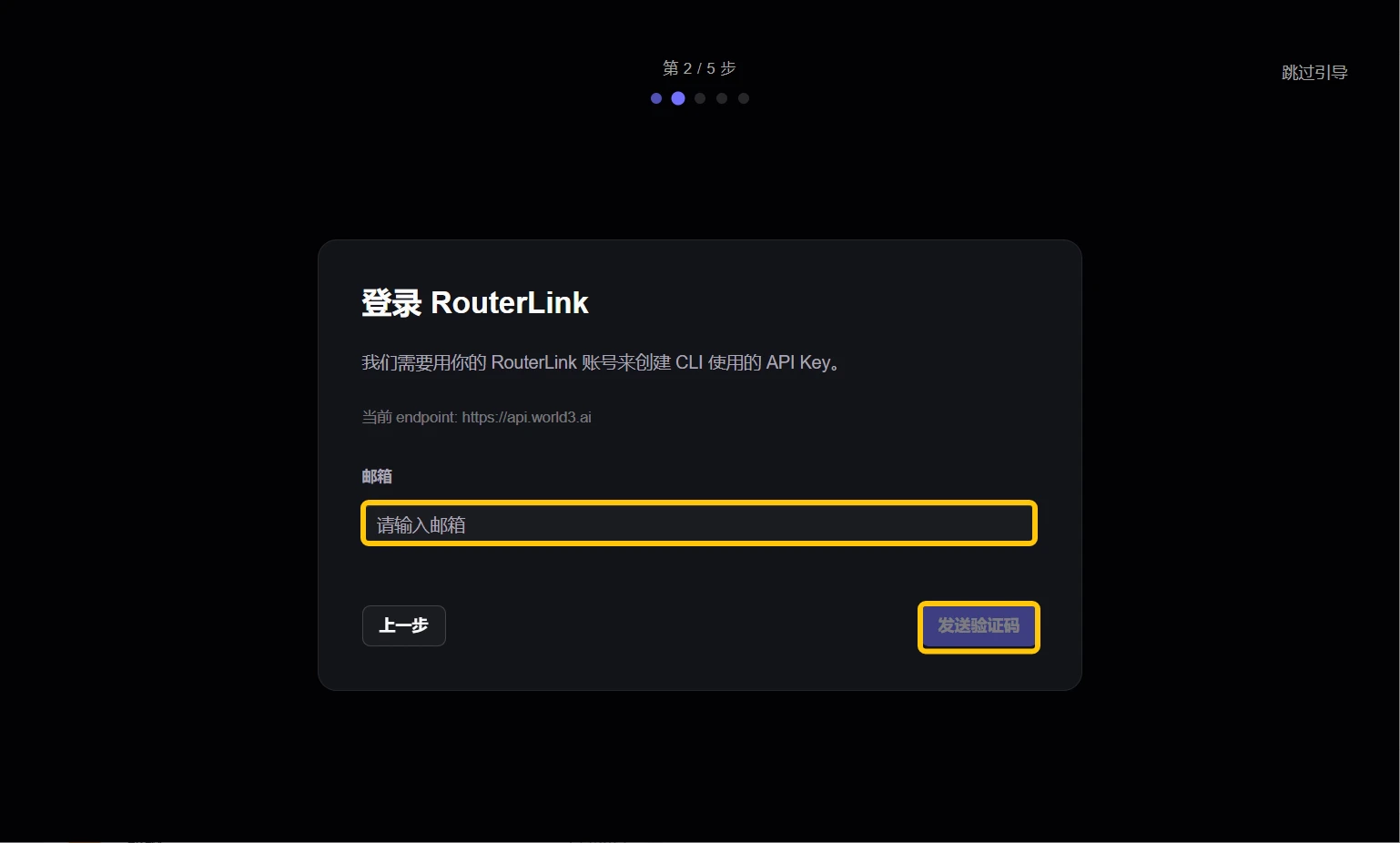
    使用邮箱登录你的 RouterLink 账户。如果你还没有账户，系统会自动为你创建一个。

    <Frame>
      <img src="https://mintcdn.com/matrixlabs/DLlrmsnO_vBIIxZH/images/img_v3_02121_487c4453-1e15-45d8-91bd-366ab62f65hu.jpg?fit=max&auto=format&n=DLlrmsnO_vBIIxZH&q=85&s=4a80b3b6fa6a258bcff1c43b9f4c23ea" alt="Img V3 02121 487c4453 1e15 45d8 91bd 366ab62f65hu" width="1538" height="926" data-path="images/img_v3_02121_487c4453-1e15-45d8-91bd-366ab62f65hu.jpg" />
    </Frame>

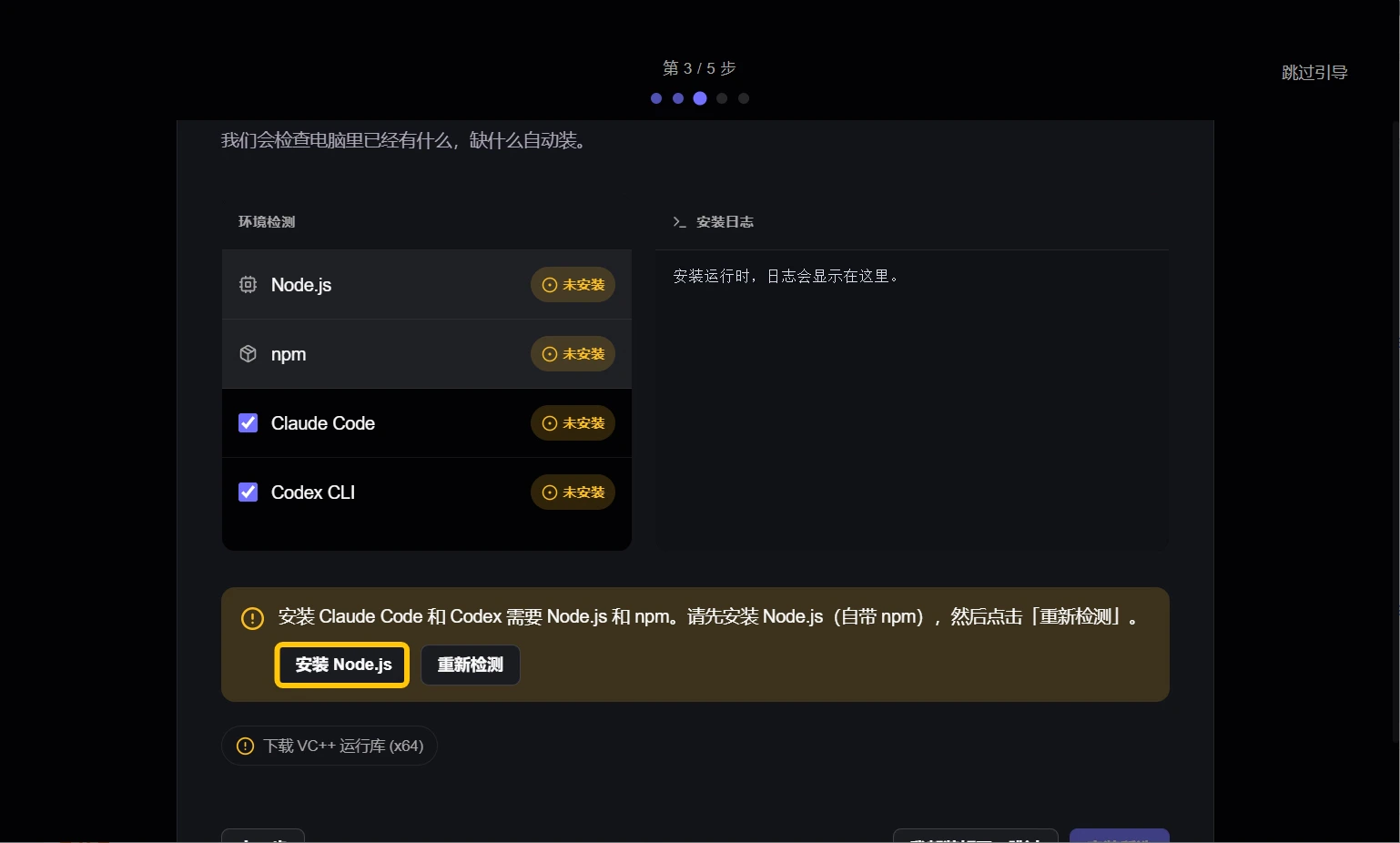
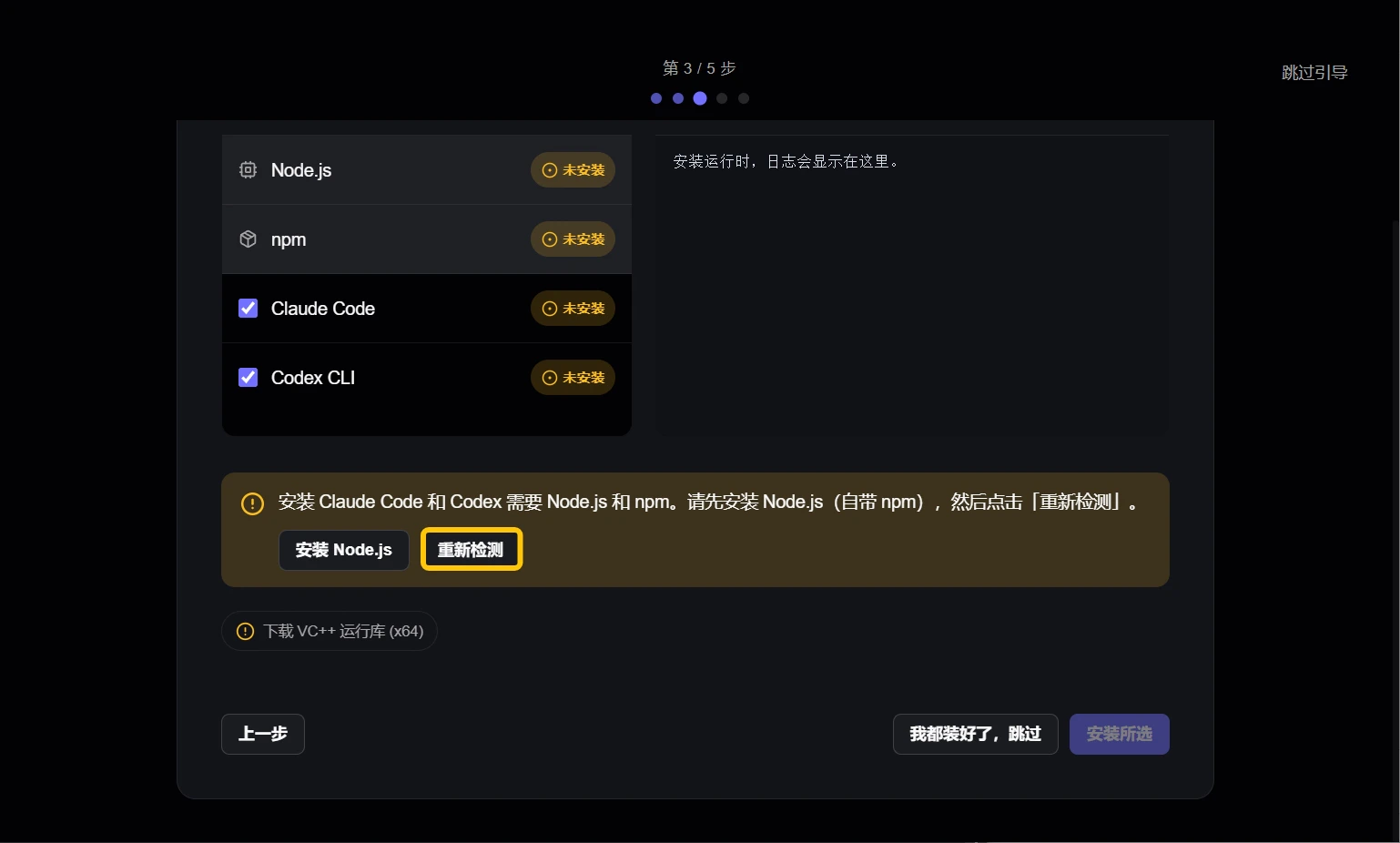
    请确认已安装 Node.js 以及你想要使用的 AI agent。

    <Frame>
      <img src="https://mintcdn.com/matrixlabs/DLlrmsnO_vBIIxZH/images/img_v3_02121_745a9644-2796-471a-8a26-299be5f950hu.jpg?fit=max&auto=format&n=DLlrmsnO_vBIIxZH&q=85&s=0deaa2776c54d5dcb4edc262ece062a0" alt="Img V3 02121 745a9644 2796 471a 8a26 299be5f950hu" width="1538" height="926" data-path="images/img_v3_02121_745a9644-2796-471a-8a26-299be5f950hu.jpg" />
    </Frame>

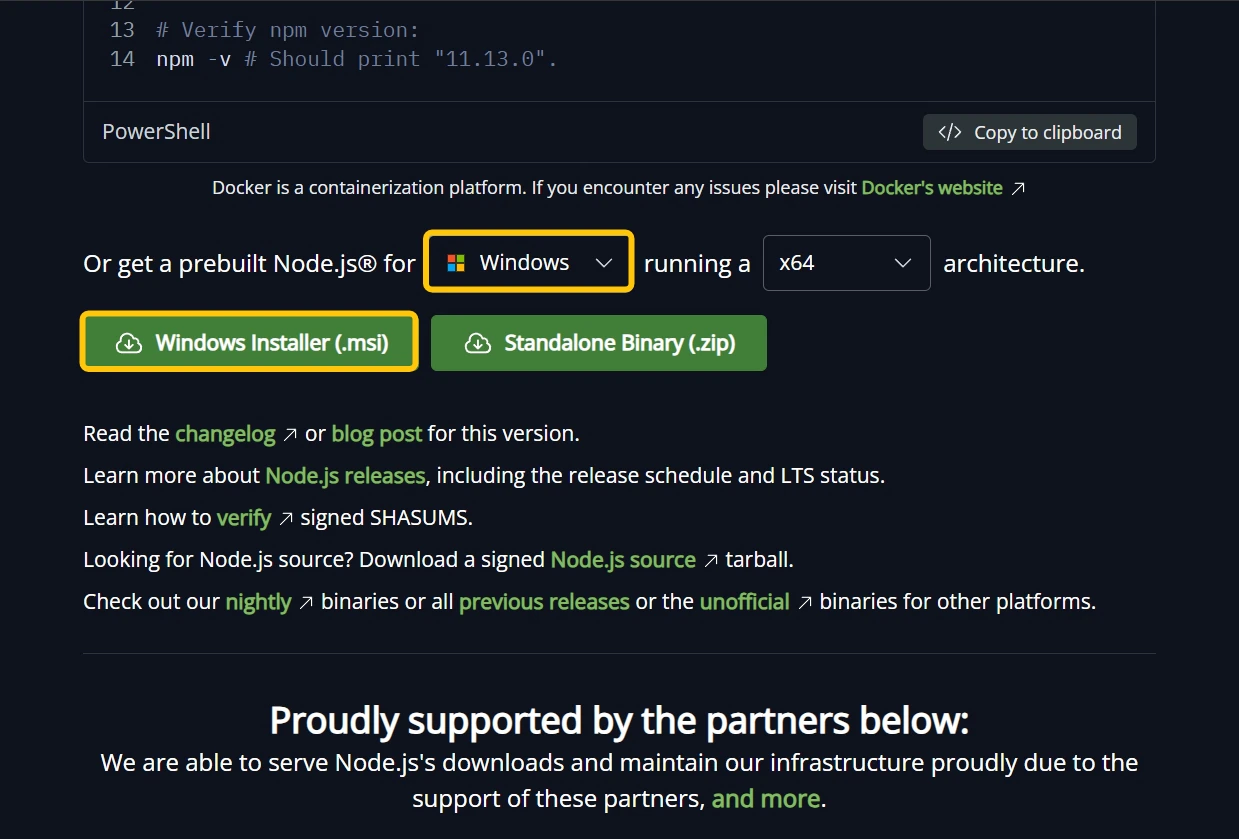
    你需要在浏览器中下载并安装 Node.js，选择与你操作系统匹配的版本。

    <Frame>
      <img src="https://mintcdn.com/matrixlabs/DLlrmsnO_vBIIxZH/images/img_v3_02121_bb594cc3-e47f-43e1-9c95-4fce668c55hu.jpg?fit=max&auto=format&n=DLlrmsnO_vBIIxZH&q=85&s=15686c7b4ef4c19fbf8ba421cec7c50c" alt="Img V3 02121 Bb594cc3 E47f 43e1 9c95 4fce668c55hu" width="1239" height="839" data-path="images/img_v3_02121_bb594cc3-e47f-43e1-9c95-4fce668c55hu.jpg" />
    </Frame>

    安装完成后，点击 "重新检测"。

    <Frame>
      <img src="https://mintcdn.com/matrixlabs/DLlrmsnO_vBIIxZH/images/img_v3_02121_b760145e-d11e-48aa-8f12-d3b8a10323hu.jpg?fit=max&auto=format&n=DLlrmsnO_vBIIxZH&q=85&s=50fca687cecf2035ef4564920a593da7" alt="Img V3 02121 B760145e D11e 48aa 8f12 D3b8a10323hu" width="1538" height="926" data-path="images/img_v3_02121_b760145e-d11e-48aa-8f12-d3b8a10323hu.jpg" />
    </Frame>

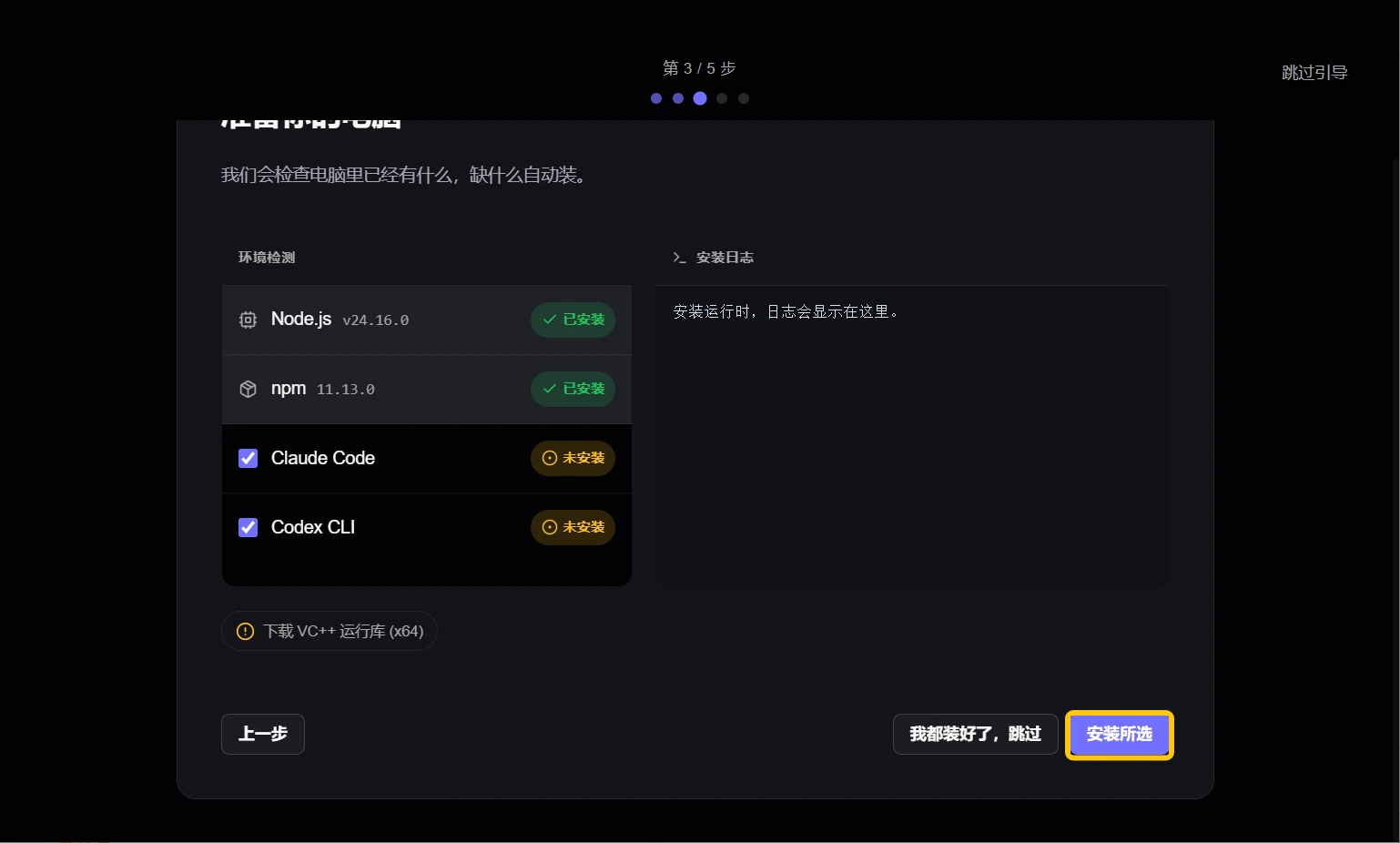
    选中想要使用的 AI Agent 后，点击 "安装所选"。

    <Frame>
      <img src="https://mintcdn.com/matrixlabs/DLlrmsnO_vBIIxZH/images/img_v3_02121_0a04f932-bdb9-4d45-b0c0-280dff2080hu.jpg?fit=max&auto=format&n=DLlrmsnO_vBIIxZH&q=85&s=a21b9c079279bb115e2d33bc2ce6d226" alt="Img V3 02121 0a04f932 Bdb9 4d45 B0c0 280dff2080hu" width="1538" height="926" data-path="images/img_v3_02121_0a04f932-bdb9-4d45-b0c0-280dff2080hu.jpg" />
    </Frame>

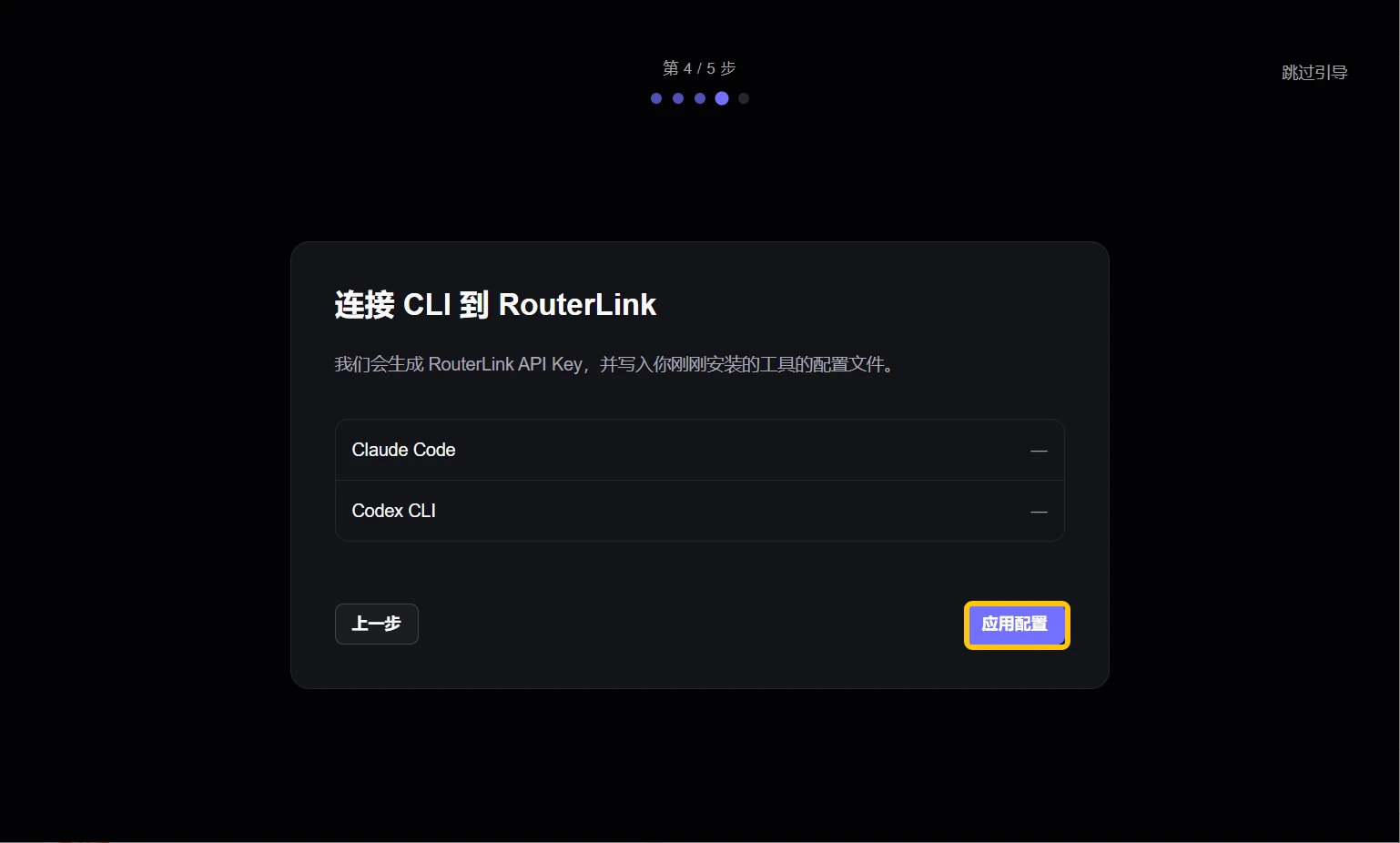
    RouterLink 会自动为你的 AI Agent 完成配置。如果你此前已配置过，Starter 会先备份你之前的配置。

    <Frame>
      <img src="https://mintcdn.com/matrixlabs/DLlrmsnO_vBIIxZH/images/img_v3_02121_f931eea8-cedc-4068-8fa8-7b5a2b0cb0hu.jpg?fit=max&auto=format&n=DLlrmsnO_vBIIxZH&q=85&s=e49b4335677c4429373816abefc4edbd" alt="Img V3 02121 F931eea8 Cedc 4068 8fa8 7b5a2b0cb0hu" width="1538" height="926" data-path="images/img_v3_02121_f931eea8-cedc-4068-8fa8-7b5a2b0cb0hu.jpg" />
    </Frame>
  </Step>

  <Step title="启动">
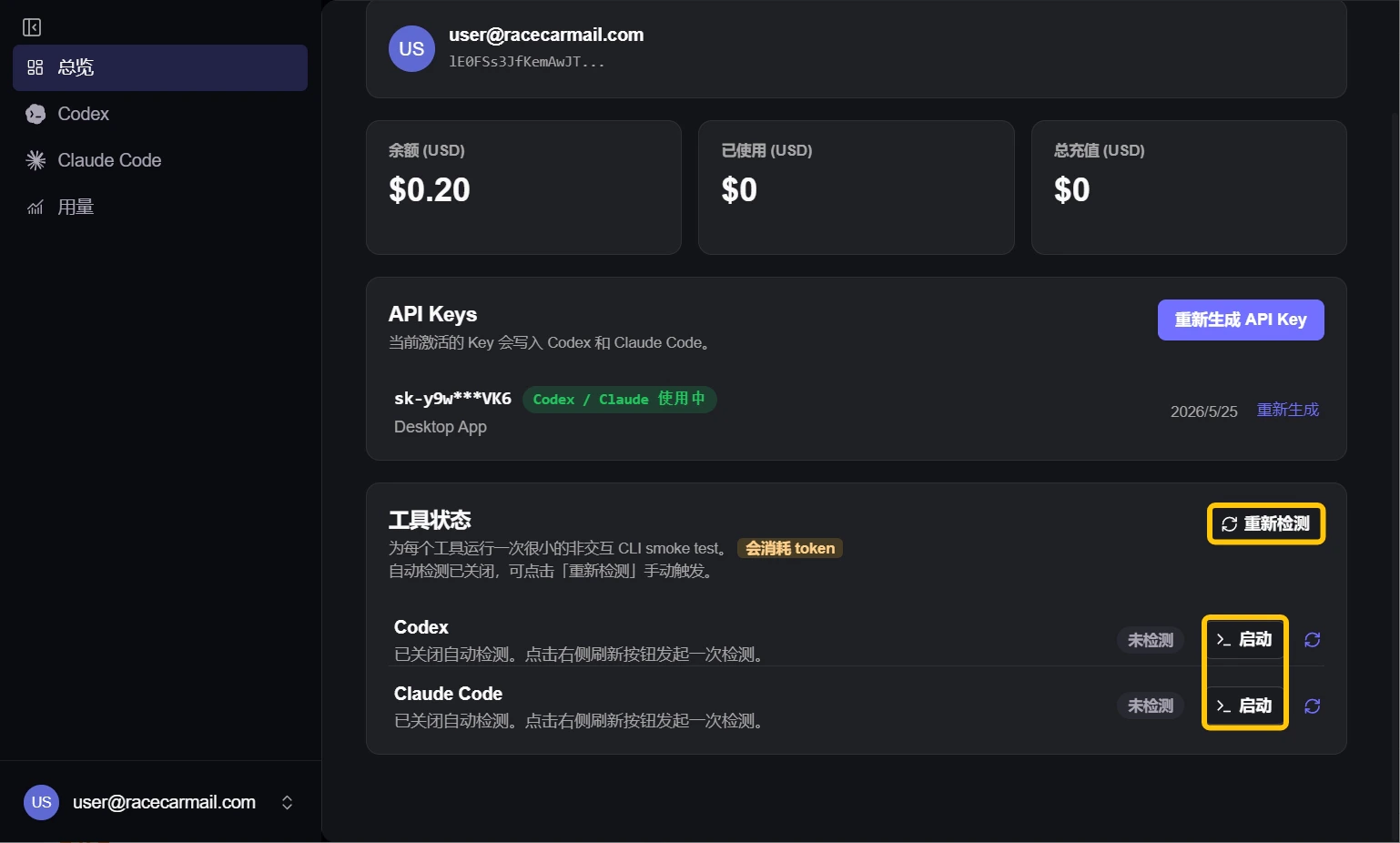
    你可以在主页查看 AI Agent 的可用状态，并快速启动它。

    <Frame>
      <img src="https://mintcdn.com/matrixlabs/DLlrmsnO_vBIIxZH/images/img_v3_02121_663a9c7c-96e8-473e-aa92-843f33bc1dhu.jpg?fit=max&auto=format&n=DLlrmsnO_vBIIxZH&q=85&s=38dcc3a67c179fcc55df98ea5e63c02b" alt="Img V3 02121 663a9c7c 96e8 473e Aa92 843f33bc1dhu" width="1538" height="926" data-path="images/img_v3_02121_663a9c7c-96e8-473e-aa92-843f33bc1dhu.jpg" />
    </Frame>

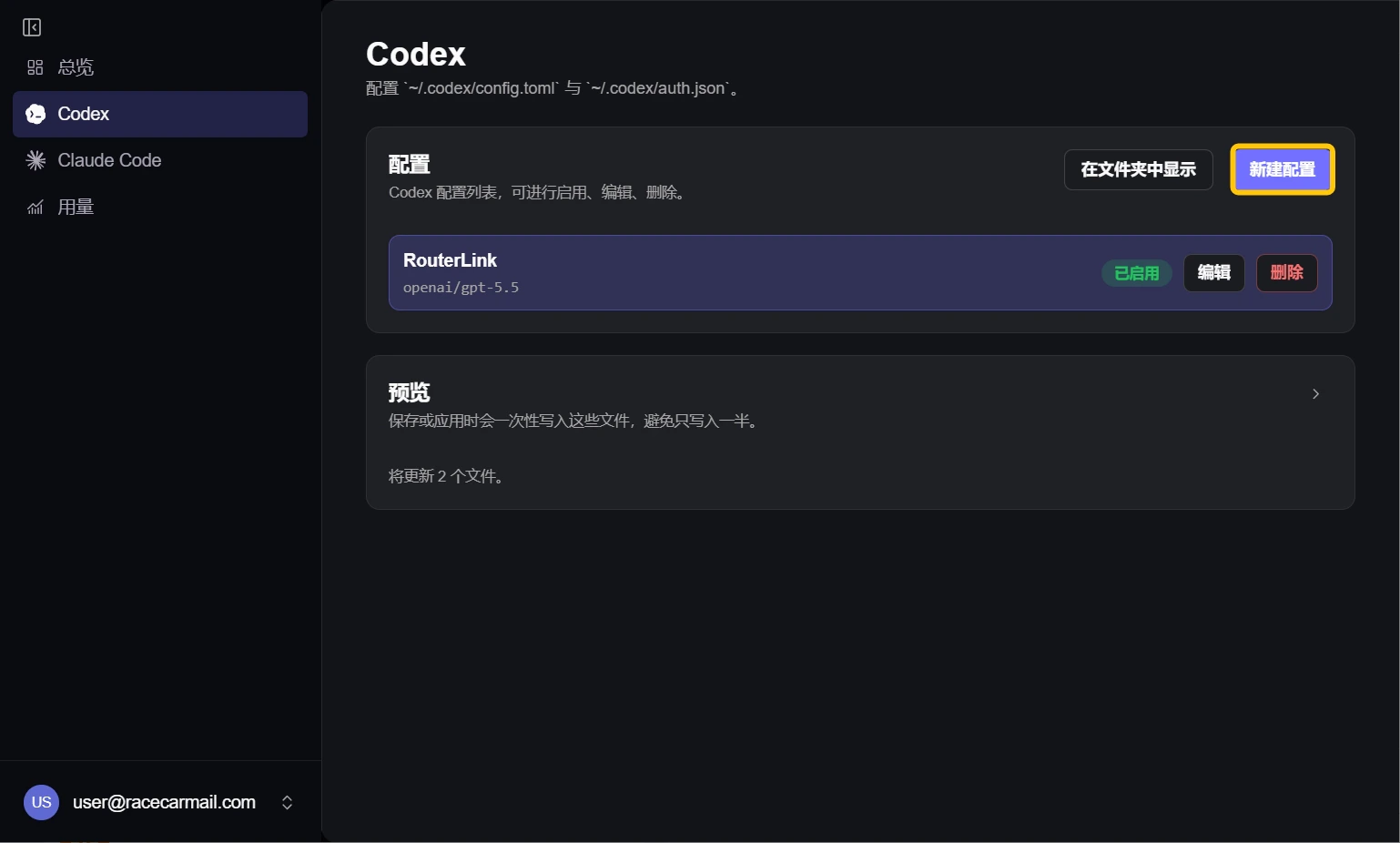
    点击左侧的 AI Agent 标签，可以配置并使用新的模型。

    <Frame>
      <img src="https://mintcdn.com/matrixlabs/DLlrmsnO_vBIIxZH/images/img_v3_02121_b024e43e-2871-494c-a362-9e3b653909hu.jpg?fit=max&auto=format&n=DLlrmsnO_vBIIxZH&q=85&s=f90c5e1cfa3a0ff83970041b53466ac5" alt="Img V3 02121 B024e43e 2871 494c A362 9e3b653909hu" width="1538" height="926" data-path="images/img_v3_02121_b024e43e-2871-494c-a362-9e3b653909hu.jpg" />
    </Frame>

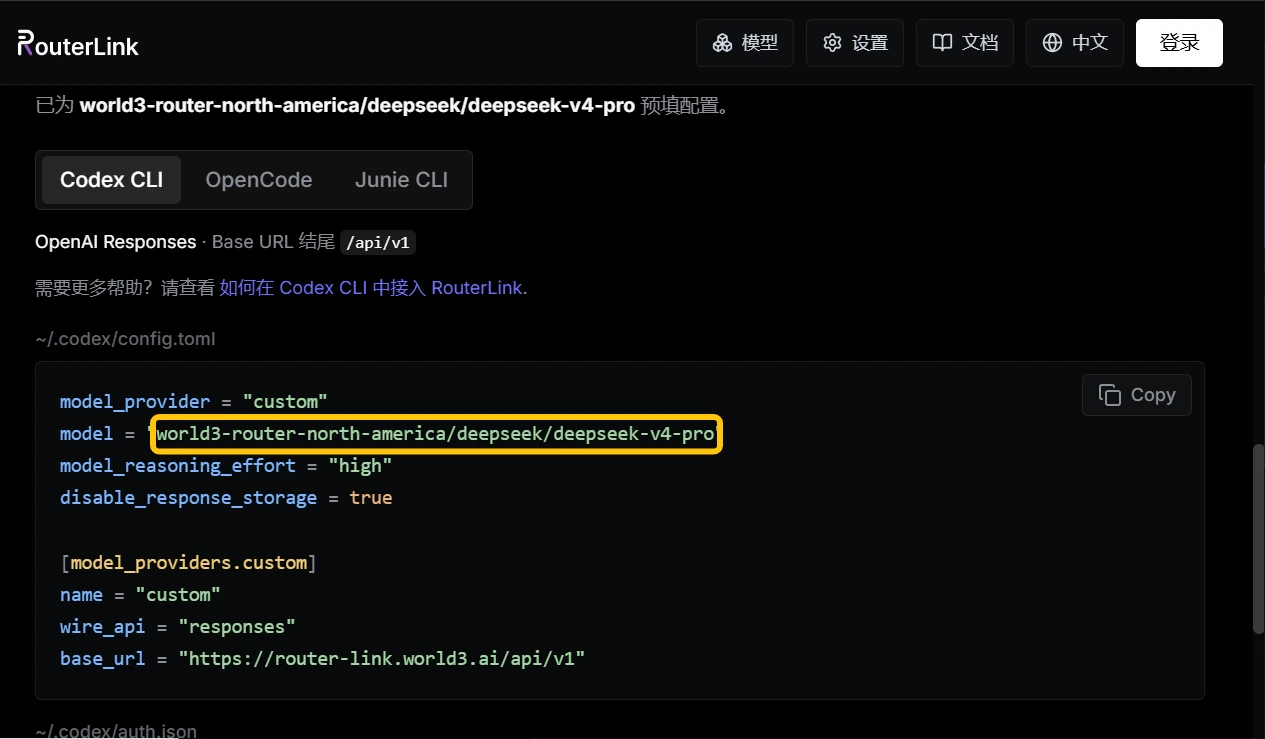
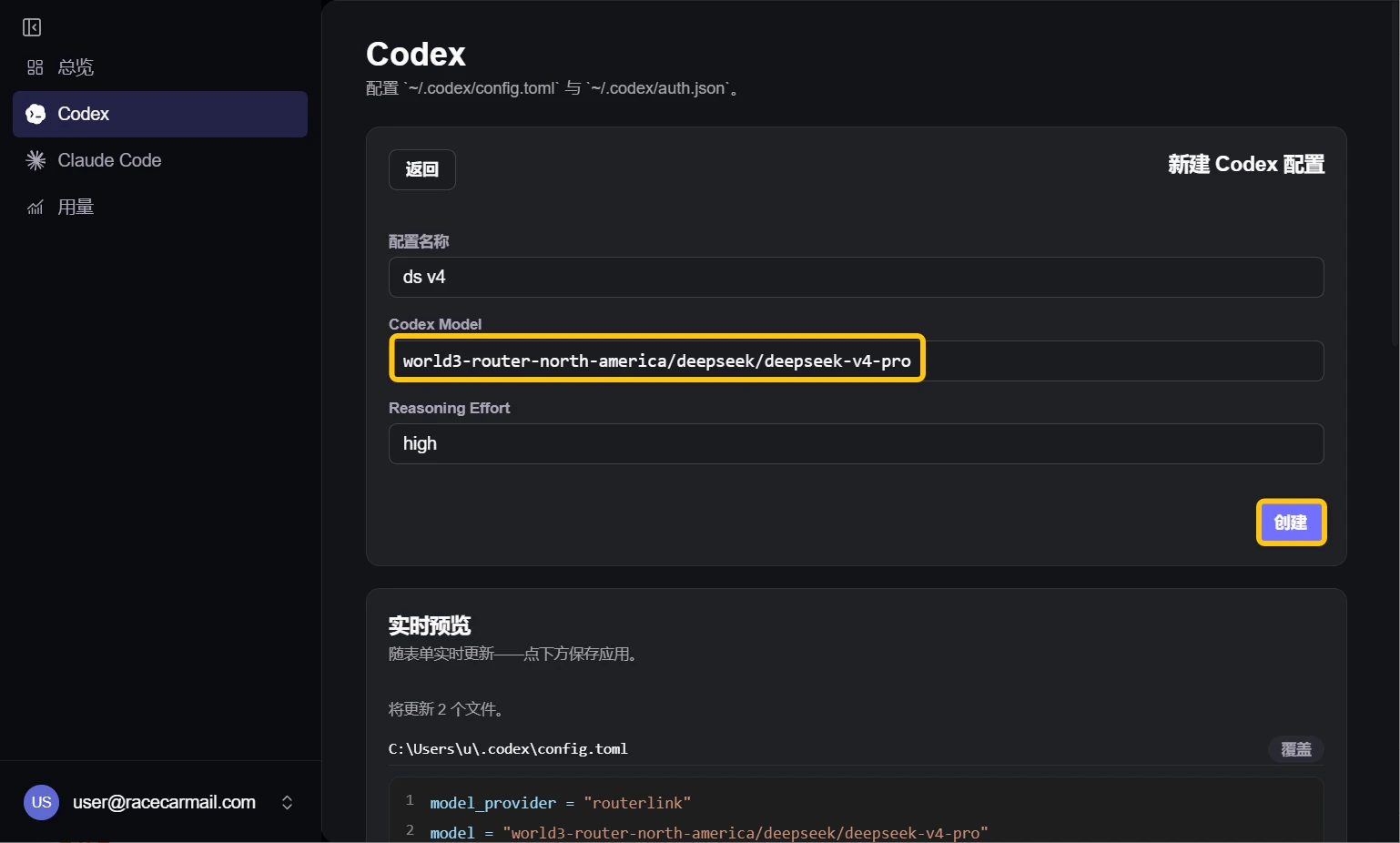
    例如，如果你要使用 DeepSeek V4 Pro，请在 Codex 的模型字段中填入 `world3-router-north-america/deepseek/deepseek-v4-pro`。
    <Frame>
      <img src="https://mintcdn.com/matrixlabs/DLlrmsnO_vBIIxZH/images/img_v3_02121_6f99f10f-2959-491a-8a53-e40b2389fahu.jpg?fit=max&auto=format&n=DLlrmsnO_vBIIxZH&q=85&s=99d0eea34b00c9a7b3d64e59b27e60ba" alt="Img V3 02121 6f99f10f 2959 491a 8a53 E40b2389fahu" width="1538" height="926" data-path="images/img_v3_02121_6f99f10f-2959-491a-8a53-e40b2389fahu.jpg" />
    </Frame>

    你也可以添加其他[模型](https://routerlink.ai/models)（Claude Code 需要使用 Anthropic-Compatible 的模型，Codex 则需要使用 OpenAI-Compatible 的模型）：

    <Frame>
      <img src="https://mintcdn.com/matrixlabs/DLlrmsnO_vBIIxZH/images/img_v3_02121_77d6bd68-98e5-49a6-a707-4aacda9c2bhu.jpg?fit=max&auto=format&n=DLlrmsnO_vBIIxZH&q=85&s=3eaa12907970bfaf8878e96597e5c537" alt="Img V3 02121 77d6bd68 98e5 49a6 A707 4aacda9c2bhu" width="1265" height="739" data-path="images/img_v3_02121_77d6bd68-98e5-49a6-a707-4aacda9c2bhu.jpg" />
    </Frame>

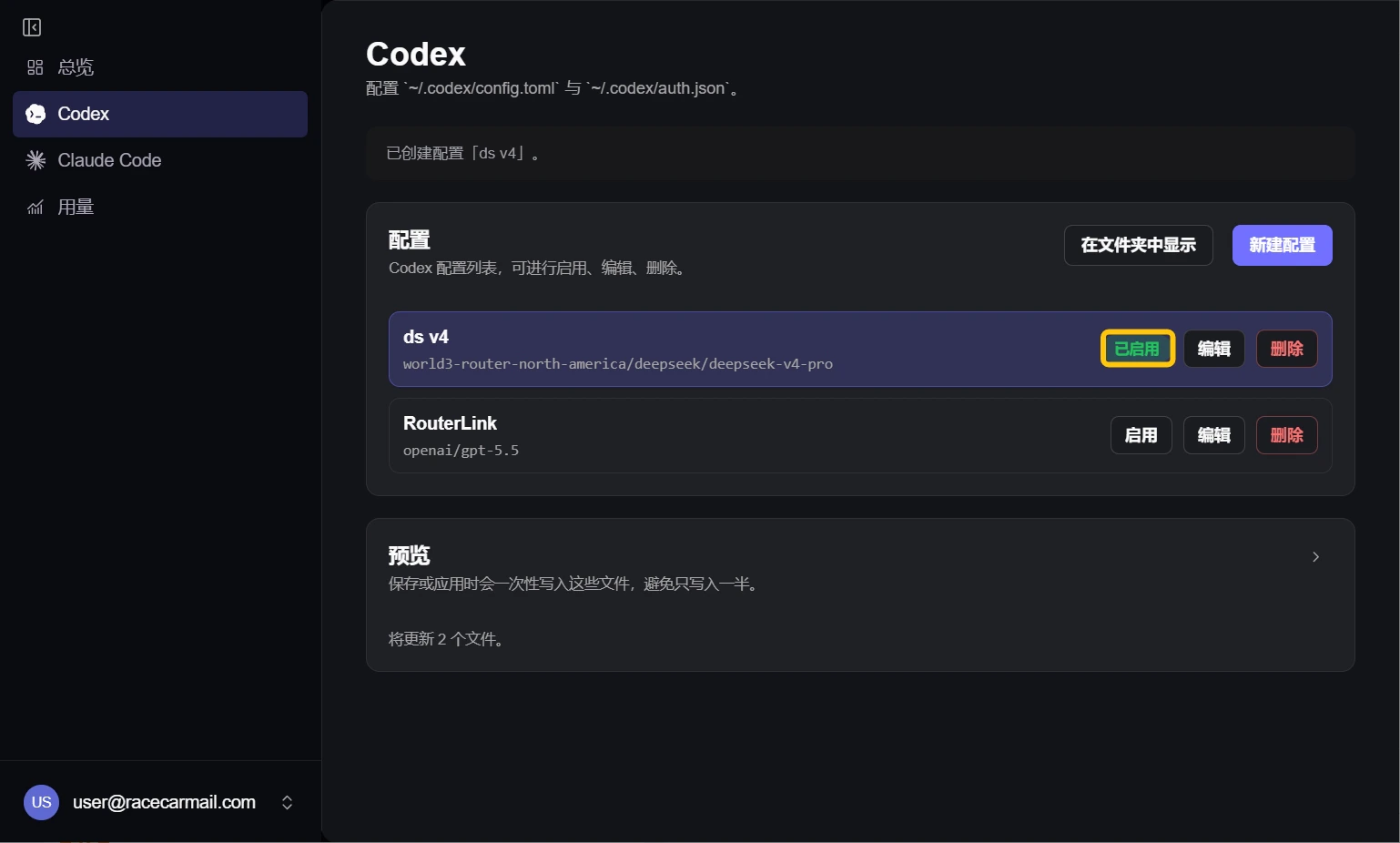
    请确认新建的配置已启用。

    <Frame>
      <img src="https://mintcdn.com/matrixlabs/DLlrmsnO_vBIIxZH/images/img_v3_02121_96ee8f33-b5f1-4b05-aec7-8f321f91f6hu.jpg?fit=max&auto=format&n=DLlrmsnO_vBIIxZH&q=85&s=c883cb2f6dd32036bc578f7163185cf0" alt="Img V3 02121 96ee8f33 B5f1 4b05 Aec7 8f321f91f6hu" width="1538" height="926" data-path="images/img_v3_02121_96ee8f33-b5f1-4b05-aec7-8f321f91f6hu.jpg" />
    </Frame>
  </Step>
</Steps>

# 故障排查

<AccordionGroup>
  <Accordion title="我之前已经配置过 Claude Code/Codex，如何切回之前的配置？">
    启动 RouterLink Starter 后，在左侧栏点击 Claude 或 Codex，然后在 Configs 中选择 "default"，并点击 "启用"。
  </Accordion>

  <Accordion title="API Error: 402 You don't have enough $WAI Credits to complete this request.">
    您的余额不足。请前往[计费页面](https://routerlink.ai/settings/billing)为账户充值。更多信息请参见：[价格](https://docs.routerlink.ai/zh/basics/price)。
  </Accordion>

  <Accordion title="如何更新 RouterLink Starter？">
    启动 RouterLink Starter 后，点击左下角的邮箱地址进入“设置”，在右侧更新一栏旁点击 “检查更新" 即可。
  </Accordion>
</AccordionGroup>